Tutor management software for independent tutors and teachers
Tutor CRM: Lesson Scheduling, Students & Payments in one platform
Manage lesson schedules, students and groups, payment tracking, homework, online booking, and learning progress in one tutor CRM.
14-day free trialNo card · then 199 ₽ for 31 days · no automatic charges
- Every feature is included in the free trial
- Works on desktop and mobile
- You choose when to renew
Your schedule stays under control
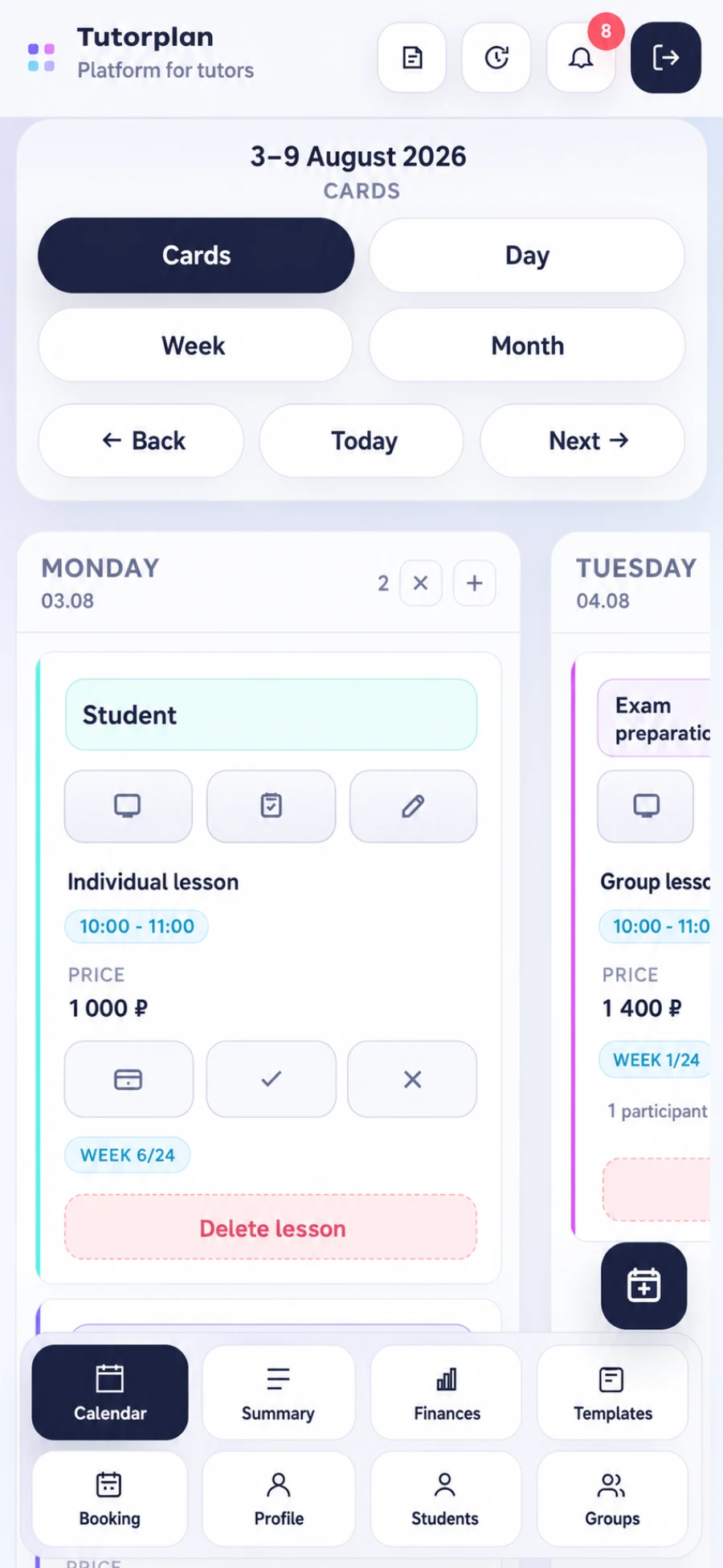
Stay on top of every workday
Less admin between lessons
The work summary highlights priorities, while group journals keep attendance, payments, and results organized.

See what needs your attention today
Lessons missing results, homework to review, overdue work, requests, and upcoming notes.

One journal for the whole group
Track attendance, payment, and learning results separately for every participant.
Student progress
Measure every student’s learning progress
Record each lesson result once, and Tutorplan turns lessons, attendance, and homework into a clear picture of student growth.
- Attendance and homework resultsAttendance rate, completed assignments, and the average grade for the selected period.
- Goals and milestonesBreak a major learning goal into clear stages with progress and deadlines.
- Topics, skills, and reviewSee whether each skill is not started, in progress, mastered, or due for review.
- History and student reportsProgress stays in a timeline, and tutors can publish reports to the student portal.
Student · Anna K.
All timeLearning progress
Homework grade trendby month
Goals and milestones3 of 4 complete
Prepare for the final assessment
Topics and skills12 skills mastered
MasteredIn progressReview
Show students their growth, from attendance to mastered skills.
Student portal
A student portal with everything needed for learning
Give students clear access to lessons, materials, payments, and results without searching through chats, spreadsheets, or old links.
A clear balance at a glance
Students see their current balance, every transaction, and the number of prepaid lessons left.
Achievements keep students motivated
Turn on gamification to celebrate learning milestones, consistency, and completed assignments.
Lessons and materials stay together
Schedule, homework, messages, and lesson board links are all available in one portal.
Readable reports for any period
Publish progress reports with attendance, homework, goals, skills, and trends for a chosen period.
Student portal
Anna K.
Prepaid lessons left6
Learning reports
Reports shared by the tutor.
June 1 — July 31Learning summary for the period
ViewFeatures
Run your practice without duplicate data entry
A lesson update is reflected immediately in your summary, payments, history, and the student portal.
Lesson calendar
Four schedule views and one lesson card with all related information.
- cards, day, week, and month
- recurring lessons and rescheduling
- attendance and payment statuses
Students and groups
CRM profiles preserve context, while the group journal tracks every participant.
- contacts, rates, and notes
- balance and transaction history
- groups, archive, and vacations
Homework
Assign homework from a lesson or template, review answers, and track overdue work.
- assignment templates
- interactive board and attachments
- status and grade for each student
Payments and analytics
Prepayments connect to lessons, while finance reports show income, expenses, and trends.
- balance and refunds
- breakdown by student and group
- charts and CSV export
Public booking
Share available time slots and receive requests directly in your work summary.
- one-time and recurring slots
- booking confirmation
- protection from schedule conflicts
Student portal
Students see upcoming lessons, homework, messages, balance, achievements, and reports.
- separate secure sign-in
- a board for each lesson
- student progress reports
- learning gamification
Work summary
Everything that needs attention between lessons is gathered on one screen.
- homework to review and overdue work
- lessons missing results
- requests, notifications, and notes
History and control
Important changes are recorded so you can understand what happened to a lesson or payment.
- activity timeline
- filters by student and event type
- important-event notifications
Everything stays connected
From lesson request to progress report
- 01
A student chooses an available slot
The public booking request appears in the tutor’s work summary.
- 02
The lesson enters the schedule
Its card connects the student, payment, homework, notes, and lesson board.
- 03
The tutor records the result
Attendance, skills, and milestones update the student’s learning progress.
- 04
Tutorplan builds the summary and report
Income, tasks, and student trends are available without duplicate data entry.
Simple pricing
Every Tutorplan feature is included in the free trial
Move your schedule and students, set up your usual workflow, and see how much time Tutorplan saves each week. No bank card is required to register.
Full accessNo card requiredNo automatic charges
after the free trial
199 ₽ for 31 days
You choose when to renew. If Tutorplan is not right for you, you pay nothing.
Start free trialUsage and payment termsFrequently asked questions
What to know before you start
How much does Tutorplan cost?
14-day free trial, then 199 ₽ for 31 days. No bank card is required and there are no automatic charges.
Is Tutorplan only a lesson calendar?
No. It is a CRM and planner for tutors, with a calendar, students and groups, homework, payments, summaries, finances, public booking, templates, activity history, and a student portal.
What is included in student progress?
Attendance, homework completion and grades, goals and milestones, topics and skills, monthly trends, result history, and reports that tutors can publish for students.
Can I manage group lessons?
Yes. Create permanent groups, set a per-participant rate, and record attendance, payment, and learning results separately for every student.
Is online booking available for new students?
Yes. Publish your available slots and share a link. New requests appear in the tutor work summary.
What can a student see in the portal?
Upcoming lessons, homework, tutor messages, balance, achievements, and published learning progress reports.
Does Tutorplan work on mobile?
Tutorplan works in desktop and mobile browsers. An Android app is also available in RuStore. On iPhone, Tutorplan works in the browser. Open the app in RuStore
Get started
Bring your schedule, students, and results into one platform
14-day free trial; no bank card required. You can move your practice over gradually.